

Review · Kinds of review
Submission readiness
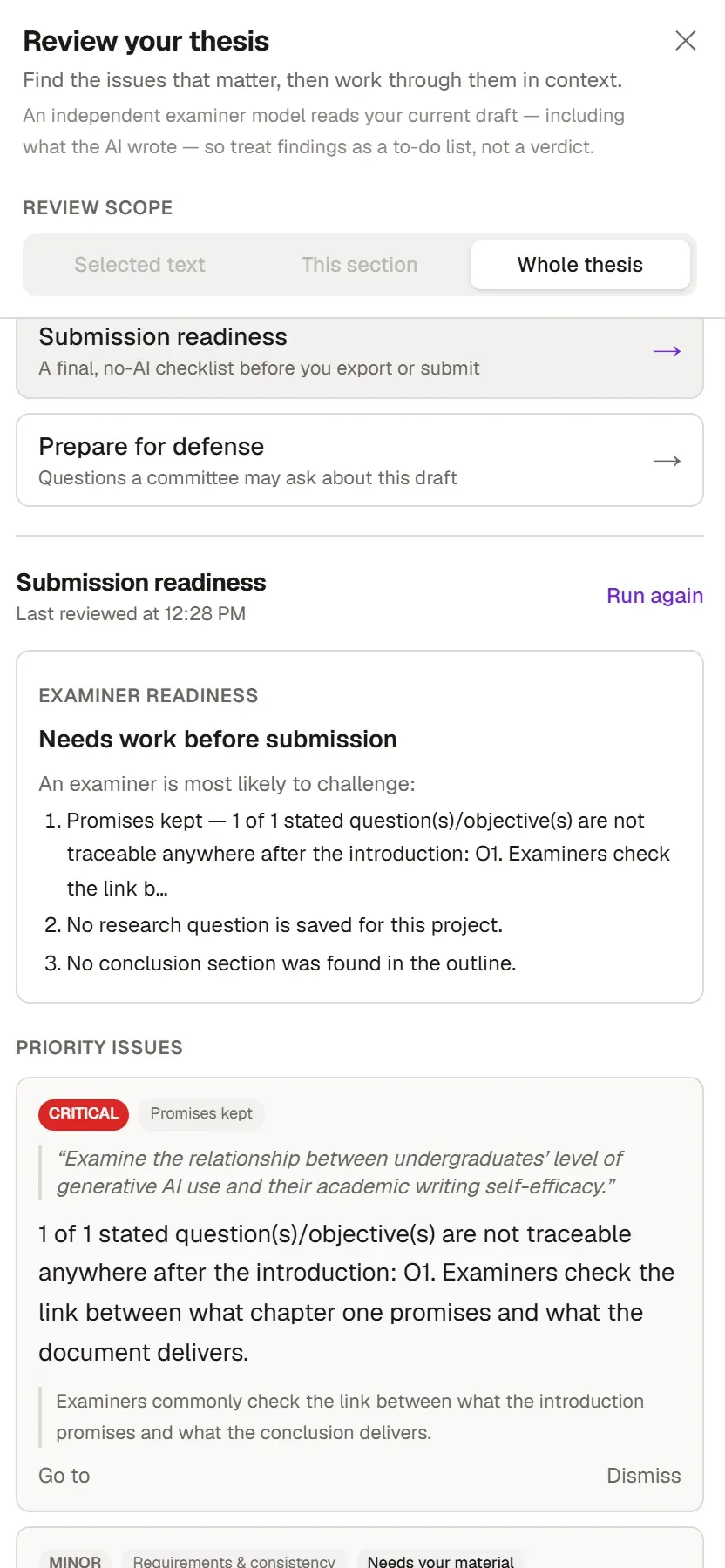
Before you export or submit your thesis, run one last scan with Submission readiness, so that no missing section, forgotten placeholder or unresolved comment is left. The list does not use AI; the result arrives instantly and comes out the same every time for the same text.
Running it
Section titled “Running it”- Switch to the Review tab on the ribbon.
- In the Document group, click Submission check. In the Review your thesis panel, the same check is called Submission readiness.
- Grongy builds the list for the whole document. For each item, jump to the problem with Go to and fix it.
- After fixing, refresh the list with Run again.
What it checks
Section titled “What it checks”It runs every Document health check, and also looks at these:
- Does the document have a title, and is a research question saved in the project?
- Is there text but no source at all in the library?
- Does the draft have no headings at all, the same heading twice, or a skipped heading level (from 1 to 3, for example)?
- Do long documents have an Introduction and a Conclusion?
- Are placeholders such as TODO or TBD, or markers like
[needs source], still in the text? - Are tracked changes or AI text still waiting for a decision? The AI text to review count in the status bar shows this too.
- Is there an image without alt text, or a table without a header row?
- Are any comments still unresolved?
- Does the text have citations but no References heading?
Reading the results
Section titled “Reading the results”The Examiner readiness box at the top sums up the overall state in one sentence; if there is a critical problem, it says “Needs work before submission”. Just below it, Priority issues are the items to look at first. What you promised shows where the document answers the questions you asked and the aims you set in the introduction. Section structure checks whether the introduction, conclusion and abstract take the expected steps.
A good submission and a very good one
Section titled “A good submission and a very good one”A clean list is the sign of a good submission. A very good one takes one more step:
| Good | Very good | How to check | |
|---|---|---|---|
| Sources and citations | Every citation’s source is in both your library and your reference list. | Every source really supports the sentence that cites it; no retracted sources. | Document health, Citation check |
| Structure and argument | The Introduction and Conclusion are there; heading levels follow on without skipping. | The questions you asked in the introduction find their answers in the conclusion. | This list, Academic review |
| Language and clarity | No spelling errors; abbreviations are spelled out where they first appear. | No overlong sentences; each concept keeps the same term from start to finish. | Live proofreading, Document health |
| Figures, tables and data | Images have alt text and tables have a header row. | The text refers to every figure and table by number; it is clear where the numbers come from. | This list, Format check |
| Formatting | The formatting is consistent throughout. | The document follows your university’s guideline. | Document health, Format check |
| AI use | No placeholders, unresolved comments or AI text awaiting a decision are left. | You have disclosed your AI use. | This list, AI-use disclosure |
This list does not check whether the disclosure is in the document. If your saved university guideline requires one, Format check looks for it.
Format check
Section titled “Format check”Format check in the ribbon’s Document group compares your document with the saved university guideline. It does not use AI, and it checks the rules the guideline states as values:
- Paper size, Margins, Body font, Font size, Line spacing
- Citation style, Required chapters, Heading levels, Required statements, Length
- Figures and tables: whether the text refers to every figure and table by number
A line at the end of each run tells you how many rules were checked. Grongy does not check rules the guideline writes out as plain prose; the panel shows them in a separate list, and you need to read those yourself. If the document has no saved university guideline, the check does not run and the panel says so.
Frequently asked questions
Section titled “Frequently asked questions”What is the difference between Submission readiness and Document health? Submission readiness runs every Document health check. On top of that, it looks at the items that matter before export: the title, placeholders, comments, tracked changes and the reference list.
How many times can I run it? As many times as you like. It does not use AI, so it does not count against your usage allowance.