

Research · Reading and comparing
Synthesis matrix
You see in a single table what each study did differently. The Synthesis matrix lines up the sources in the document’s library side by side: each row is a source, each column a question (focus, sample, method, finding, limitation).
When it helps
Section titled “When it helps”You’ll open it most before you write your literature review, while comparing your sources. The table shows which methods and which samples come up most often. It also helps you find a research gap in the limitations the studies share.
Building the table
Section titled “Building the table”- In your document, open the Research tab, or scroll down to the document’s library on the Find papers page.
- Of the List, Map and Synthesis tabs in the library header, click Synthesis.
- Click Build synthesis table. The library needs at least 2 sources.
- When the table is ready, hide the columns you don’t want with the column buttons. Grongy remembers this choice on this device.
- If you later add sources to the library or remove some, a warning appears above the table. To update the table, click Rebuild table.
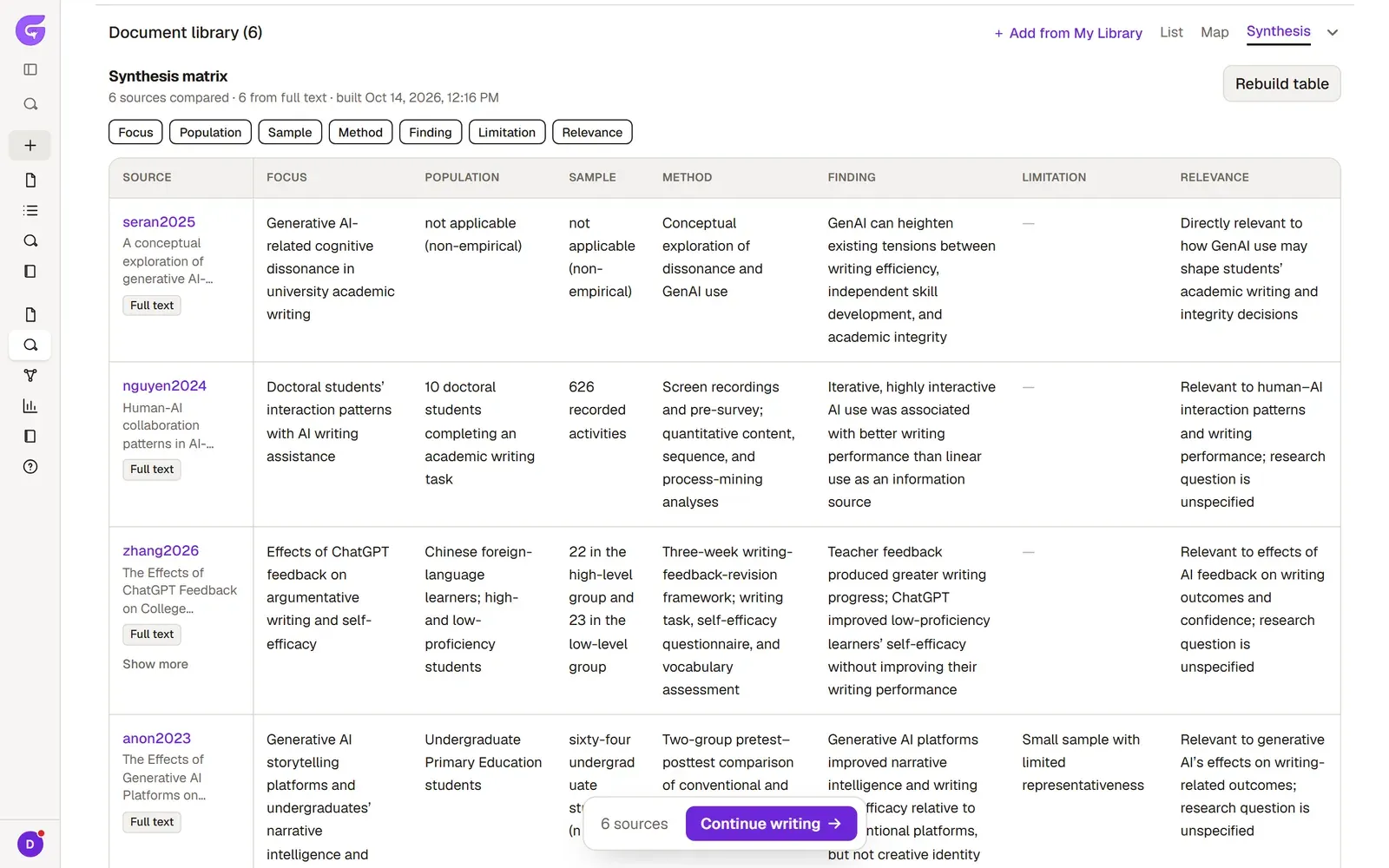
Columns
Section titled “Columns”| Column | What it shows |
|---|---|
| Focus | What the source studies |
| Population | Who or what the study was carried out on |
| Sample | How many people or units; the number as the source gives it |
| Method | How the study was done |
| Finding | The main result |
| Limitation | Where the study falls short |
| Relevance | How closely the source relates to your research question |
If a source gives no information on a point, the cell says Not stated in this source. Grongy never puts anything in the table that isn’t in the source.
Full text or abstract
Section titled “Full text or abstract”Next to each row, Grongy notes what it filled that row from:
- Full text: Grongy filled the row with passages it picked from the paper’s own PDF.
- Abstract only: the source had no PDF, so Grongy read only the abstract. These rows stay emptier.
The line above the table tells you how many sources were compared and how many were read from their full text.
Frequently asked questions
Section titled “Frequently asked questions”Can I put what’s in the table straight into my thesis? The table is a reading tool. Before you use a finding in your thesis, open the place where it appears in the source in the PDF reader and check it, and write the sentence yourself.
The table disappeared. Grongy keeps the table in this browser. If you switched to another device or cleared your browser data, build it again with Build synthesis table.
What does it look like on a phone? On a narrow screen, each source becomes its own card and the columns stack one under another.