

Review · Kinds of review
Academic review
Academic review reads your text the way an examiner would. It checks the argument, the research question, the method, the findings, the structure and the key claims. It is the check the panel recommends.
When to run it
Section titled “When to run it”- When you finish a section and want to see its weak points before you move on.
- Before you send the thesis to your advisor, to have it read once from start to finish.
- When you want to test the argument of a single paragraph. Select just that text.
Running it
Section titled “Running it”- Open the Review your thesis panel and choose the Review scope: Selected text, This section or Whole thesis.
- In the panel, click Start academic review. The Academic review button on the ribbon’s Review tab also starts the review directly.
- Grongy reads a long text in parts, and the panel shows how many parts it has reviewed. You can click Stop at any time.
- When the results arrive, start with the top finding: jump to the sentence with Go to, then fix it or click Dismiss.
What the results contain
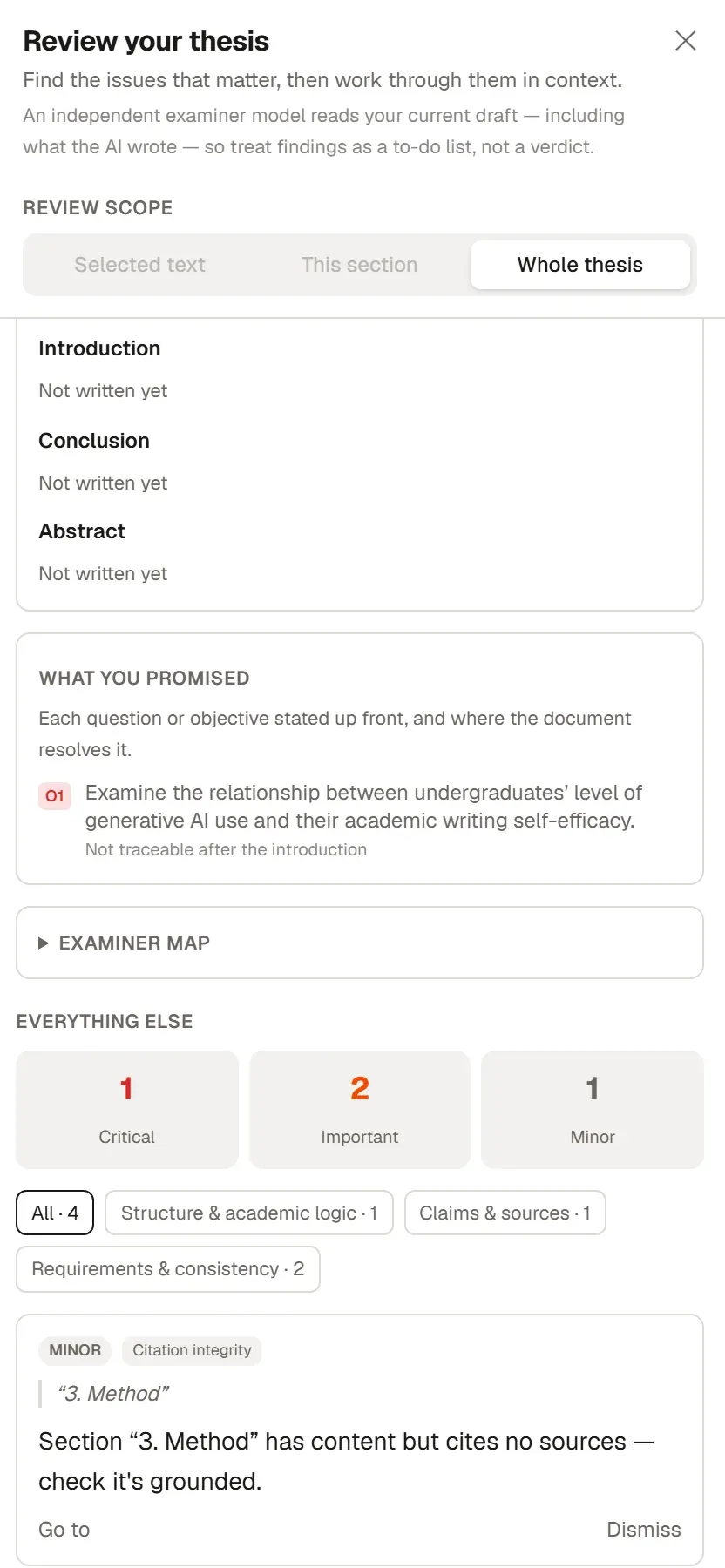
Section titled “What the results contain”- Examiner readiness sums up the overall state in one sentence, for example “Needs work before submission” or “Broadly sound — only minor notes left”. Below it you see the points an examiner is most likely to question. It is not a grade or a score.
- Priority issues shows the few findings to deal with first. Each one comes with a short note on why that point matters to an examiner.
- Section structure checks whether the Introduction, Conclusion and Abstract take the expected steps. In the introduction these include Context, Research gap and Research question or aim; in the conclusion, Answer to the research questions and Limitations. Click a step it found to go to that sentence. A section you have not written yet shows Not written yet.
- What you promised lists every question you asked and every aim you set in the introduction, and where the document answers it.
- Examiner map shows the checks this run looked at, and Everything else shows the remaining findings.
With the Whole thesis scope, the Document health checks run too, and their findings join the same list.
What Grongy fixes before the review
Section titled “What Grongy fixes before the review”With the Whole thesis scope, Grongy fixes a few things it can be certain about before it starts reading. The Fixed before reviewing notice tells you how many:
- It turns a miswritten citation, for example one given under the second author’s name, into its correct form. You can undo this change.
- For a citation in your text that has no match in your library, it searches for the source. If the author, year and topic match exactly, it adds the source to your library. Check that what it added is the work you meant.
- It adds short wording fixes that can stand in for the original as tracked changes. How to reject the ones you don’t want is on the Comments and changes page. It never applies a fix that would overstate your claim; it leaves that one to you.
Frequently asked questions
Section titled “Frequently asked questions”Does it work on selected text too? Yes. Grongy reads the selected text or section as part of the whole thesis; it does not count sections missing from that part as gaps.
What does the warning that part of the review did not finish mean? Grongy could not read some parts of the long text. Try again with Run again.
What is the Start academic review suggestion in the status bar? If your draft is long enough and you have not run a review yet, this shortcut appears in the status bar. It starts the same academic review.