

Account
AI-use disclosure
Grongy drafts a disclosure of your AI use from the document’s records, and you have the final say. If AI helped you, saying so openly is part of academic integrity.
Where to find it
Section titled “Where to find it”Open the Bibliography tab on the left edge of the document. The AI-use disclosure section sits next to the reference list.
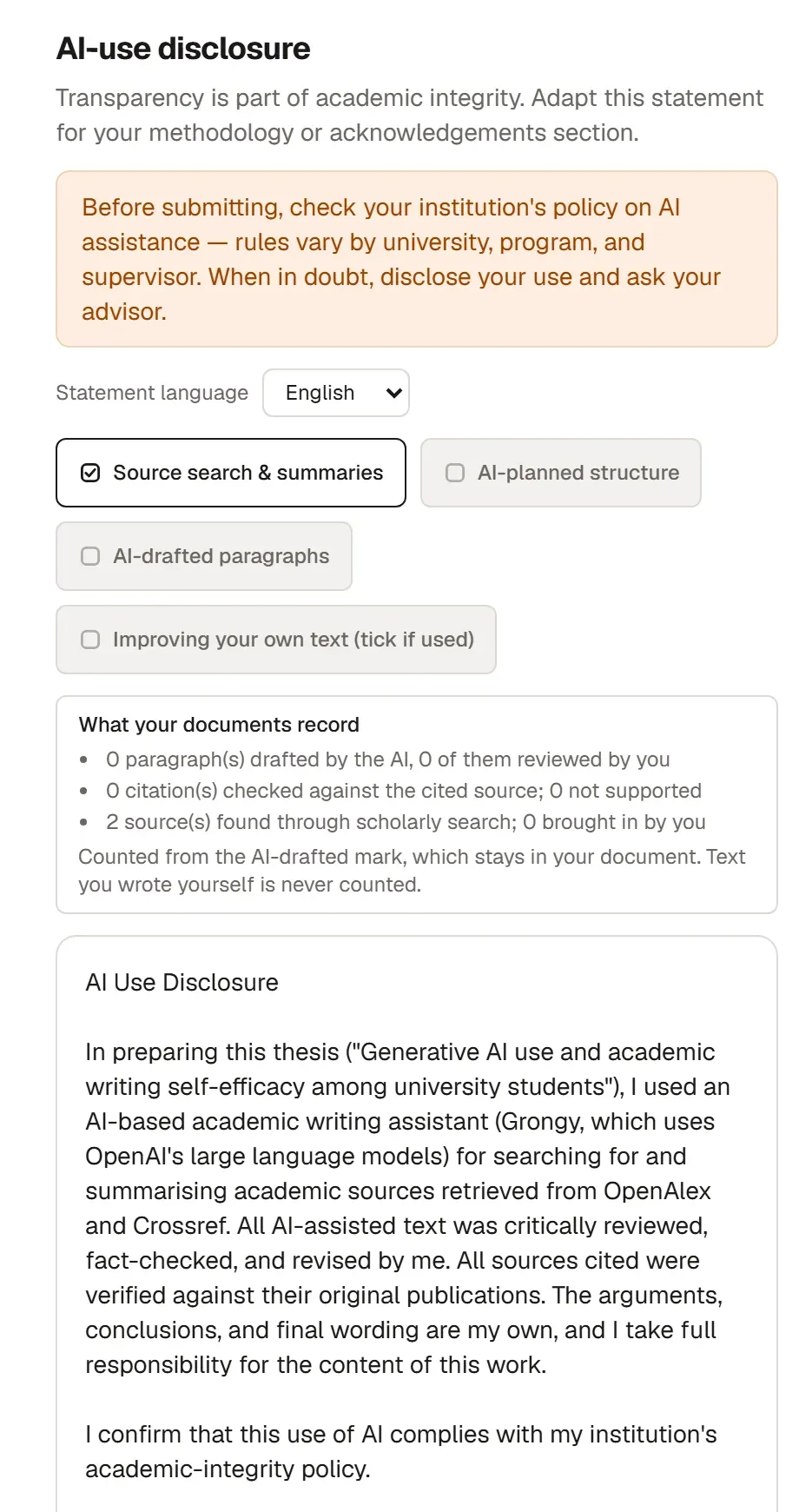
Prepare the disclosure
Section titled “Prepare the disclosure”-
Choose the Statement language: Türkçe, English, Español, Français or Deutsch. It starts out set to the document’s writing language.
-
Tick what you used Grongy for:
- Source search & summaries
- AI-planned structure
- AI-drafted paragraphs
- Improving your own text (tick if used)
Grongy ticks some of these itself, based on the document’s records. Work that improves your own text isn’t recorded, so if you did that, tick the box yourself.
-
If the What your documents record box appears, look at it. It shows:
- how many paragraphs AI wrote and how many of them you reviewed,
- how many citations were checked against their source,
- how many sources were found through academic search and how many you added yourself.
The paragraph counts come from the mark that AI-written paragraphs keep in the document; text you wrote yourself is never counted.
-
Read the draft below. The text changes as you change your choices.
-
Insert into document adds the disclosure, with its heading, to the end of the document you last edited in this project. Copy statement copies the text to the clipboard instead. The text ends with a placeholder line for your signature, name and date; fill it in yourself.
Edit the draft
Section titled “Edit the draft”The draft is a ready-made template, and it speaks in your voice. For example, it says that you compared every source you cite with its original publication and that your use of AI follows your institution’s policy. Once you’ve inserted it, read every sentence:
- Keep what you actually did and delete what you didn’t.
- If needed, add which section you had help with and how much.
- Move the disclosure to where your institution wants it. That’s usually the methods section or the acknowledgments.
Frequently asked questions
Section titled “Frequently asked questions”Does the disclosure go in the bibliography? No. The disclosure is a separate text. Insert into document puts it at the end of the document, and you decide where it stays.
How can I tell which paragraphs Grongy wrote? Paragraphs written by AI stay marked in the document, and the ones you haven’t reviewed yet are counted in AI text to review. Section prompts explains how this works.